Archive Entry
Item Layout Tool
ILitem-layoutsIL001Archived Apr 06, 2026
⭐Recommended
Authors: Andrews54757
Andrews54757Endorsed by:Andrews54757
Andrews54757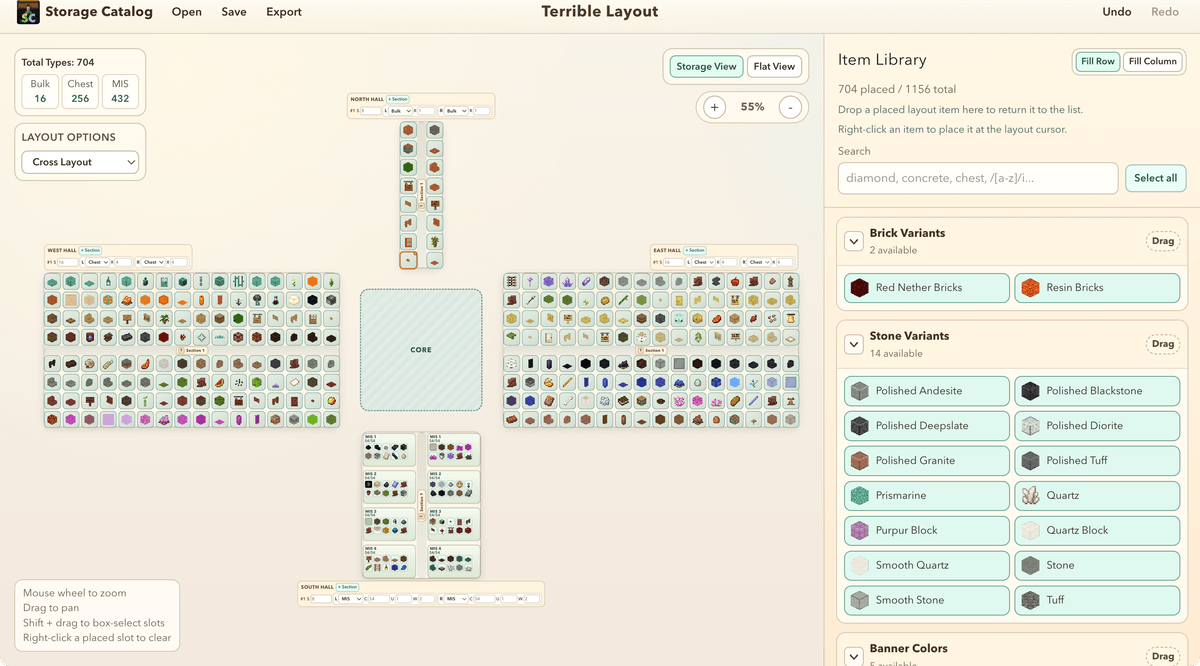
A useful web app for designing storage system item layouts.
https://layout.storagecatalog.org/
In the past, to design a layout, you had to place down all the items/blocks in the game into a world and move them one by one to a storage mockup. Now, with the layout tool, you can drag+drop items into a 2D mockup in your browser, and then export it to your world directly with a schematic.
Usage guide
- Set a layout in the "Layout Options" dropdown. You can select a variety of preset configurations like cross shape, H-shape, octa hall, and more. Let me know if you need a layout not listed there and I will add it.
- You can configure each hall to change how long they are, how many chests you have in each slice, and what type they are (bulk, chest hall, and MIS). You can add multiple sections as well for organization. Names of halls/sections are changeable by clicking on them.
- Drag and drop items from the item library (on the right) to the mockup to build your layout. If you prefer, you can also right click on an item to place it where the highlighted cursor. Shift+click and drag to select multiple items in the mockup and the item layout, you can drag them simultaneously.
- After you finish, click the export button to save the layout to a schematic, you can then use the Litematica mod to paste the schematic into your world (see TT006)
Notes
It's fully functional but is still a work in progress. I will add custom item groupings, and ability to change Minecraft versions (currently 1.21.11 items) in the near future. Let me know if you have any suggestions!